This time we will talk about OCI DNS. At first glance, it looks like a complex service but turns out very powerful. In this scenario we will setup a configuration where a VCN can resolve mydomain.tld hosts in your own domain.
Introduction to Oracle VCN and DNS
Let’s first start with an introduction on how Oracle VCNs and DNS works. What is important to know if that the communication in this case is used for all IaaS and PaaS services in OCI. It is a requirement you use this way so that IaaS and PaaS services are able to communicate. It is possible to change the DNS configuration on your machine, but then it can be possible that virtual machines cannot communicate with PaaS services anymore.
When you run an Oracle Application in OCI, for example E-Business Suite, and use an Base Database Service for running your Oracle Database workloads, they communicate using Oracle DNS services.
When you look on an IaaS machine in OCI, for example Oracle Linux 8 installation, you will see the DNS configuration pointing to a specific IP address including the domains to resolve. Here you see the DNS configuration of my test machine.
[root@dns ~]# cat /etc/resolv.conf
; Any changes made to this file will be overwritten whenever the
; DHCP lease is renewed. To persist changes you must update the
; /etc/oci-hostname.conf file. For more information see
;[https://docs.cloud.oracle.com/iaas/Content/Network/Tasks/managingDHCP.htm#notes]
;
# Generated by NetworkManager
search hub.oraclevcn.com external.hub.oraclevcn.com
nameserver 169.254.169.254
As you can see it has a local address. That is the address of the local DNS agent that is communicating with OCI DNS services. What about the search domains?
The way the domain structure is build in OCI is as follows:
Every VCN has it’s own domain that always ends with oraclevcn.com. The main domain is [VCN_NAME}.oraclevcn.com. And then there is a subdomain for the subnet within that VCN. So that is [SUBNET_NAME].[VCN_NAME].oraclevcn.com.
So let’s say my VCN is called hub. My subnet is called external. And my VM is called DNS. My FQDN for the machine is dns.external.hub.oraclevcn.com.
This is something you do not want to change as the communication to other services can break. So always make sure your DNS server is set to IP 169.254.169.254, that is the VCN Resolver.
Important! You cannot resolve FQDNs in another VCN.
Resolving my own domain
To start resolving my own domain my recommendation is to start using Custom DHCP Options in the OCI DNS service. For the traffic the other way, we need a DNS listener. Let me break this configuration down, but keep it simple.
Here is a small drawing on high level on the setup.
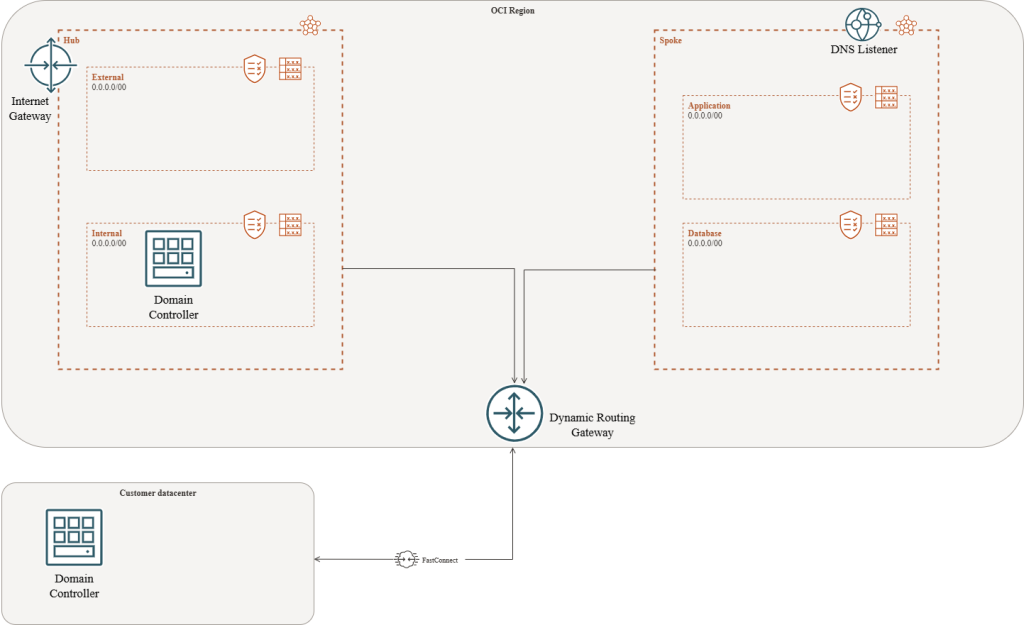
As you can see we have two VCNs, Hub and Spoke. Every VCN has two subnets for specific workloads. In this case we would like all resources in the Spoke subnet to resolve endpoints in the domain mydomain.tld. That domain is my Enterprise domain, facilitated by a Windows Domain Controller which also runs DNS. That domain controller is replicated with the domain controller in the datacenter of the customer over a FastConnect. Now we have to see how OCI DNS knows where to go if I request a resolve for an endpoint for that domain.
As you can see in the picture, I added a DNS Listener in the Spoke VCN. That specific configuration is for part two. Let’s see what needs to be done for the spoke to resolve mydomain.tld.
When the VCN is created, we need to create a Custom DHCP option for each VCN. In the spoke, it will look something like this:
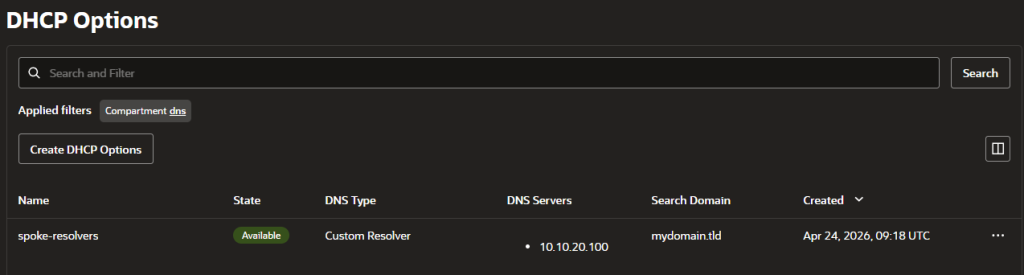
Important! If you have multiple servers for DNS for HA purposes for example, then you need to put a Network Loadbalancer before the servers. OCI DNS can only handle one IP per domain in the Custom DHCP Option.
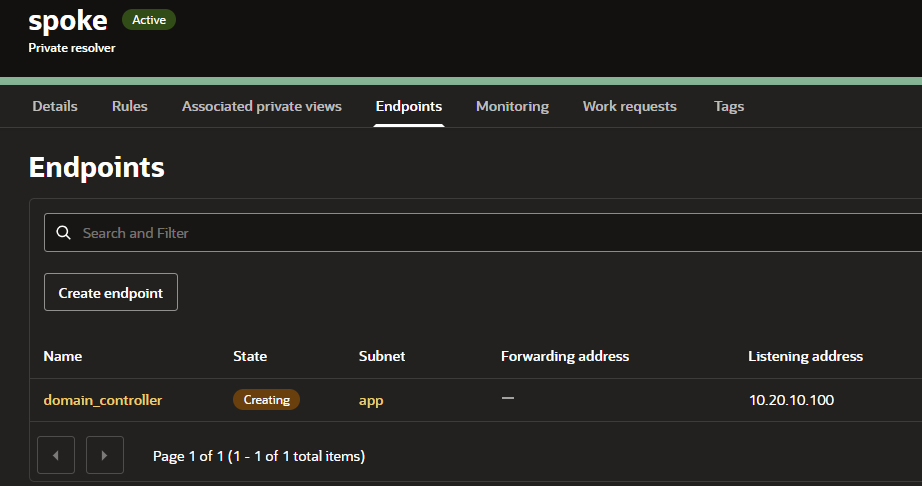
Now, we also want out Windows Domain Controller to resolve the PaaS resources in the spokes as well. For that, we created the DNS listener. Let me show you where to create the listener.
Menu –> Networking –> DNS Management –> Private Resolvers –> [SPOKE VCN] –> Endpoints.
Create a listener endpoint in one of the subnets in the VCN. My recommendation is to create it in the subnet where all traffic is coming in by default. For example where the application servers or loadbalancers are.
Notes
- Make sure Port 53 UDP/TCP is allowed incoming on the subnet where your Windows Domain Controller runs.
- Make sure the same security rule is added to all VCNs where a listener is. So traffic coming from the domain controller, going to the listener IP.
- Create Conditional forwarders in your Windows DNS for each VCN. So [VCN_NAME].oraclevcn.com to the IP address of the listener in that VCN.
Usecases
When extending your on-premise network to OCI and you want your on-premise and OCI resources to communicate, you want to do that on FQDN or hostname. This solution provides you the opportunity to do so while leveraging all the native tooling of the Oracle Cloud Infrastructure.
Happy engineering and see you in part two!