Introduction
In my last blog I talked about the basics of OCI DNS, how it works and how you can resolve to your own domain. So what if I want to resolve a resource from the Hub VCN in the Spoke VCN?
We case we use now it a bit different, but the basics are the same. Let’s look at the picture.
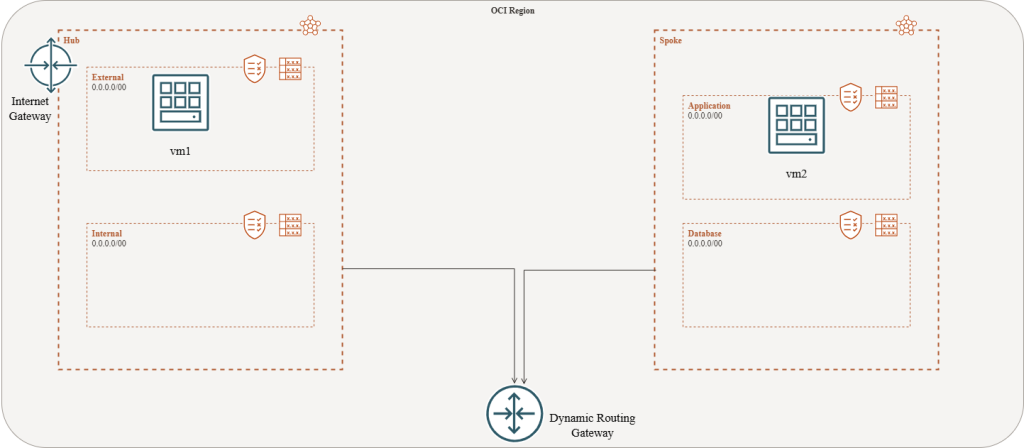
I would like my machine vm1 in the Hub to resolve the IP address of vm2 in the spoke. When I do a NSLOOKUP it cannot find it as you can see:
[root@vm1 ~]# nslookup vm2.spoke.app.oraclevcn.com
Server:         169.254.169.254
Address:        169.254.169.254#53

** server can't find vm2.spoke.app.oraclevcn.com: NXDOMAIN
Solution
In OCI DNS there is something that is called Private Views. Every VCN has a private view. In these private views are all domains for the VCNs, so all the subnets. To be able to resolve the machines in the Spoke VCN we need to make sure we can access the Private view in the Hub VCN. Let me show you how we do that.
Go to Menu –> Networking –> DNS Management –> Private Resolvers –> [VCN NAME] –> Associated private views.
In that view you can add a private view. In this case I added the Private view of the spoke VCN to the Hub VCN. See the picture below.
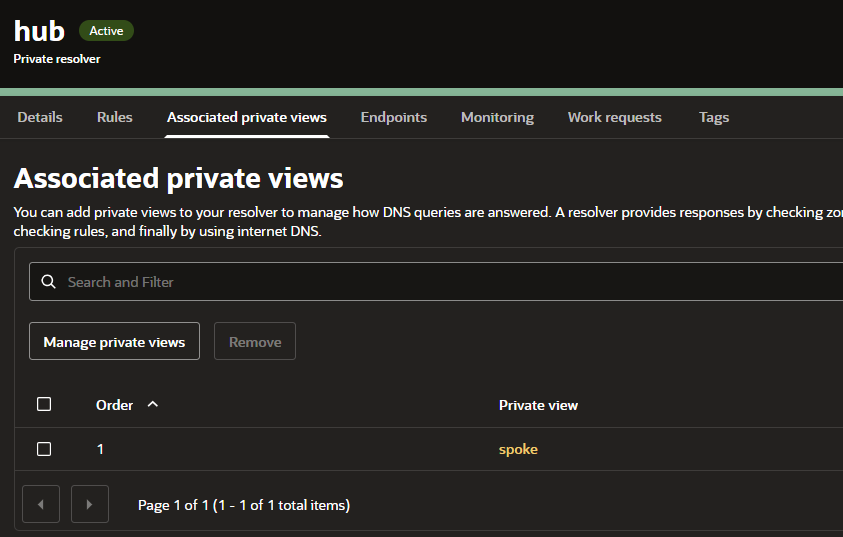
It might take a few minutes for the OCI DNS service to learn about it, but the result is now good.
[root@vm1 ~]# nslookup vm2.app.spoke.oraclevcn.com
Server:         169.254.169.254
Address:        169.254.169.254#53

Non-authoritative answer:
Name:   vm2.app.spoke.oraclevcn.com
Address: 10.20.10.51
Use cases
When you for example use the File Storage Service (FSS) in OCI, you want your mountpoint to be resisting in just one subnet, usually in the hub VCN. In that case I would recommend to add the Hub private view to the spokes so that you can mount the FSS on FQDN instead of IP address. Then you can always see where you FSS resides in your tenant.
The best benefit of this, is that is using all of the native tools within the Oracle Cloud Infrastructure and so it leverage security as well. You can always control which part of your network you would like to resolve.
Happy engineering! See you in the next one 🙂